

iPhone users now have the ability to auto-scroll through Instagram reels. You can enable or disable this feature via the three-dot menu located in the bottom right corner of a reel.
Key Information
- Instagram reels can now auto-scroll, playing continuously without the need for swiping or scrolling.
- The Auto-scroll feature can be toggled on or off through the three-dot menu in the bottom right corner while watching a reel.
- As of now, this feature appears to be available exclusively for iPhone users.
The auto-scroll function for Instagram reels, previously seen on the recently launched Instagram app for Fire TV, is now being introduced to the smartphone app. Although details are limited, it seems that iPhone users now have access to an ‘Auto Scroll’ option that allows them to activate or deactivate the feature.
To adjust the setting, simply tap the three-dot icon in the bottom right corner of the reel being viewed, and then toggle the Auto-scroll option as needed.
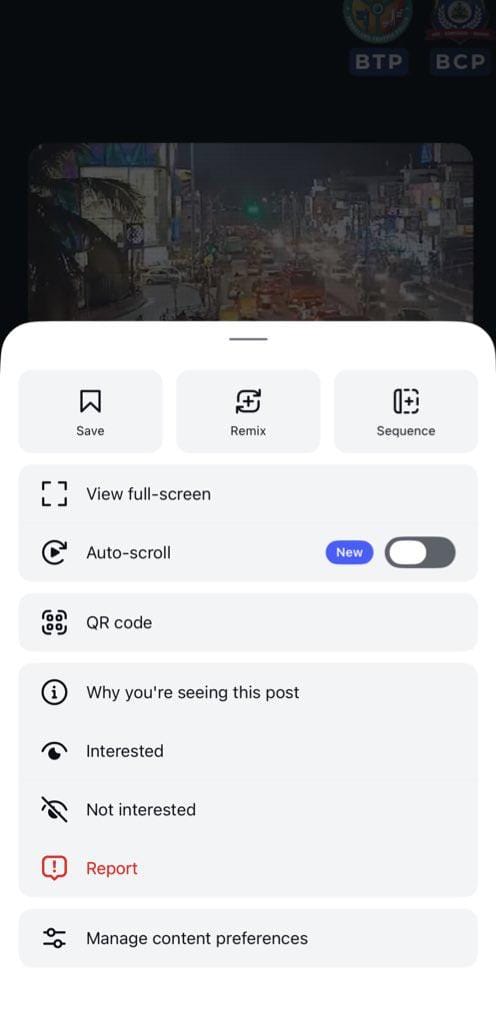
Instagram has been testing the Auto-scroll feature since mid-2025, and it appears that it is now ready for a wider rollout. We couldn’t locate the feature on our Android devices, suggesting it is currently exclusive to iPhones.
This feature performs as expected: when active, once you finish watching a reel, the next one will automatically begin playing. If you’re in the mood for a binge, this can alleviate the need for constant thumb scrolling. However, it may also lead to extended screen time, so be sure to use this feature wisely.


